06 Compare Models to Select the Best Hyperparameters
Published: June, 2024, ATOM DDM Team
Please check out the companion tutorial video: 
This tutorial will review AMPL functions for visualizing the results of a hyperparameter search in order to find the optimal hyperparameters for your model.
After performing a hyperparameter search, it is prudent to examine each hyperparameter in order to determine the best combination before training a production model with all of the data. Additionally, it is good to explore multiple performance metrics and visualize the predictions instead of relying solely on metrics.
For the purposes of this tutorial, we simply ran Tutorial 5,
“Hyperparameter Optimization”, with different parameters such as those
outlined
here
to get enough models for comparison. Specifically, we created additional
NN and XGBoost
models as well as using fingerprint and scaffold splits. If you
don’t want to run that many models, you can use the result_df saved
here: dataset/SLC6A3_models/07_example_pred_df.csv.
In this tutorial, we will focus on these functions:
Import Packages
from atomsci.ddm.pipeline import compare_models as cm
from atomsci.ddm.pipeline import hyper_perf_plots as hpp
from atomsci.ddm.pipeline import perf_plots as pp
import pandas as pd
pd.set_option('display.max_columns', None)

# ignore warnings in tutorials
import warnings
warnings.filterwarnings('ignore', category=FutureWarning)
warnings.filterwarnings('ignore', category=RuntimeWarning)
Get Model Results and Filter
First we pull the results of the hyperparameter search into a dataframe.
In Tutorial 5, “Hyperparameter Optimization”, we used
get_filesystem_perf_results() which packs hyperparameters in a dict
in the column model_parameters_dict. Here we use the individual
hyperparameter columns to create visualizations.
The result_df used here as an example is the result of calling
get_filesystem_perf_results() once after training several hundred
models with different parameters. These models were all saved in a
single folder, but the function works iteratively so it can search an
entire directory tree if a parent folder is passed.
# # call the function yourself
# result_df=cm.get_filesystem_perf_results(result_dir='dataset/SLC6A3_models/', pred_type='regression')

# use example results
result_df=pd.read_csv('dataset/SLC6A3_models/07_example_pred_df.csv', index_col=0)

result_df=result_df.sort_values('best_valid_r2_score', ascending=False)
print(result_df.shape)

# show useful columns
result_df[['model_uuid', 'split_uuid', 'best_train_r2_score', 'best_valid_r2_score', 'best_test_r2_score']].head()
(467, 41)
model_uuid |
split_uuid |
best_train_r2_score |
best_valid_r2_score |
best_test_r2_score |
|
|---|---|---|---|---|---|
310 |
b24a2887-8eca-43e2-8fc2-3642189d2c94 |
c35aeaab-910c-4dcf-8f9f-04b55179aa1a |
0.776865 |
0.562091 |
0.519325 |
306 |
9b6c9332-15f3-4f96-9579-bf407d0b69a8 |
c35aeaab-910c-4dcf-8f9f-04b55179aa1a |
0.950677 |
0.559590 |
0.480895 |
291 |
d8e25713-bf6c-4ba0-917a-69f0ea1472b9 |
c35aeaab-910c-4dcf-8f9f-04b55179aa1a |
0.930726 |
0.557156 |
0.497192 |
334 |
1a3e4b13-f860-4acf-8300-e2ac5766caa6 |
c35aeaab-910c-4dcf-8f9f-04b55179aa1a |
0.801391 |
0.556679 |
0.523567 |
321 |
57a62e20-f18e-4afa-8ce2-315f0fcc950a |
c35aeaab-910c-4dcf-8f9f-04b55179aa1a |
0.780693 |
0.556103 |
0.521270 |
We can look at a brief count of models for important parameters by creating a pivot table. Here we can see ECFP fingerprints and RDKit features and fingerprint and scaffold splitters were used for each model type. A fingerprint splitter provides a more stringent test of model performance by making sure the validation and test compounds are structurally dissimilar to the training set compounds.
# model counts
model_counts=pd.DataFrame(result_df.groupby(['features','splitter','model_type'])['model_uuid'].count()).reset_index()
model_counts=model_counts.pivot(index='model_type',columns=['splitter','features',], values='model_uuid')
model_counts
splitter |
fingerprint |
scaffold |
fingerprint |
scaffold |
|---|---|---|---|---|
features |
ecfp |
ecfp |
rdkit_raw |
rdkit_raw |
model_type |
||||
NN |
26 |
29 |
25 |
96 |
RF |
30 |
30 |
30 |
32 |
xgboost |
47 |
26 |
20 |
76 |
Often, certain random combinations of hyperparameters result in terribly
performing models. Here we will filter those out so they don’t affect
the visualization by only keeping models with a validation r2_score
of 0.1 or greater.
result_df.best_valid_r2_score.describe()
count    4.670000e+02
mean    -6.111789e+73
std      1.320769e+75
min     -2.854206e+76
25%     -2.751967e-01
50%      2.719028e-01
75%      4.323609e-01
max      5.620908e-01
Name: best_valid_r2_score, dtype: float64
# filter out objectively bad performing models
result_df=result_df[result_df.best_valid_r2_score>0.1]
result_df.shape
(264, 41)
result_df.best_valid_r2_score.describe()
count    264.000000
mean       0.405931
std        0.108515
min        0.110739
25%        0.337459
50%        0.418931
75%        0.484987
max        0.562091
Name: best_valid_r2_score, dtype: float64
After filtering out models with extremely poor metrics, we can see that some combinations don’t work at all, and are completely filtered from the set. For example, decision tree based models using RDKit or ECFP features work very poorly to predict on fingerprint-split models.
#  model counts
model_counts=pd.DataFrame(result_df.groupby(['features','splitter','model_type'])['model_uuid'].count()).reset_index()
model_counts=model_counts.pivot(index='model_type',columns=['splitter','features',], values='model_uuid')
model_counts
splitter |
fingerprint |
scaffold |
fingerprint |
scaffold |
|---|---|---|---|---|
features |
ecfp |
ecfp |
rdkit_raw |
rdkit_raw |
model_type |
||||
NN |
8.0 |
23.0 |
11.0 |
86.0 |
RF |
NaN |
30.0 |
NaN |
32.0 |
xgboost |
3.0 |
21.0 |
NaN |
50.0 |
Visualize Hyperparameters
There are several plotting functions in the hyper_perf_plots module
that help visualize the different combinations of features for each type
of model.
Examine overall scores
plot_train_valid_test_scores() gives a quick snapshot of your
overall model performance. You can see if you overfitted and get a sense
of whether your partitions are a good representation of future
performance. Because the splitter can have a drastic effect on model
performance, these plots are also separated by split type.
Here we see a fairly typical pattern where the training set metrics are higher than validation and test partitions. It is good to see that the validation and test scores are similar across many models, indicating that the models should generalize to new data well. For fingerprint splits, we see an odd trend where the model performs better on the test set than the validation set (remember - we want to minimize MAE or RMSE!), suggesting that the split is problematic since the validation set does not necessarily reflect the generalization capability of the model accurately.
hpp.plot_train_valid_test_scores(result_df, prediction_type='regression')

Examine Splits
plot_split_perf() plots the performance of each split type,
separated by feature type, for each performance metric.
We can see that fingerprint splits perform much worse than scaffold splits for this dataset, and but RDKit and ECFP features perform differently. ECFP features work better for scaffold splits while RDKit features work better for fingerprint splits. Recalling the filtering from above, we know that RDKit features for fingerprint splits are only represented by NN models, which may skew these results.
hpp.plot_split_perf(result_df, subset='valid')

General Model Features
We also want to understand general hyperparameters like model type and
feature type and their effect on performance. We can use
plot_hyper_perf() with model_type='general' as a shortcut to
visualize these.
We can see that random forests or neural networks perform the best while ECFP features perform better than RDKit. Additionally, the random forest models are very consistent while there is more variability in the NN and XGBoost model performance.
hpp.plot_hyper_perf(result_df, model_type='general')

RF-specific Hyperparameters
We can also use plot_hyper_perf() to visualize model-specific
hyperparameters. In this case we examine random forest models because
they generally perform the best for this dataset.
Here, we can see two distinct sets of valid_r2_scores (probably from
fingerprint vs scaffold split models), but both sets show
similar trends. For rf_estimators it looks like 100-150 trees is
optimal, while rf_max_depth does worse below ~15 and improves slowly
after that. rf_max_features doesn’t show a clear trend except that
below 50 might result in worse models.
hpp.plot_hyper_perf(result_df, model_type='RF', subset='valid', scoretype='r2_score')

We can quickly get a list of scores to plot with get_score_types()
and create the same plots with different metrics.
hpp.get_score_types()
Classification metrics:  ['roc_auc_score', 'prc_auc_score', 'precision', 'recall_score', 'npv', 'accuracy_score', 'kappa', 'matthews_cc', 'bal_accuracy']
Regression metrics:  ['r2_score', 'mae_score', 'rms_score']
hpp.plot_hyper_perf(result_df, model_type='RF', subset='valid', scoretype='mae_score')

NN Visualization
When visualizing hyperparameters of NN models in this case, it is
slightly hard to see important trends because there is a large variance
in their model performance. To avoid this, we use plot_hyper_perf()
with a subsetted dataframe to look at a single combination of splitter
and features.
Plot Features |
Description |
|---|---|
avg_dropout |
The average of dropout proportions across all layers of the model. This parameter can affect the generalizability and overfitting of the model and usually dropout of 0.1 or higher is best. |
learning_rate |
The learning rate during training. Generally, learning rates that are ~10e-3 do best. |
num_weights |
The product of layer sizes plus number of nodes in first layer, a rough estimate of total model size/complexity. This parameter should be minimized by selecting the smallest layer sizes possible that still maximize the preferred metric |
num_layers |
The number of layers in the NN, another marker of complexity. This should also be minimized. |
best_epoch |
Which epoch had the highest performance metric during training. This can indicate problematic training if the best_epochs are very small. |
max_epochs |
The max number of epochs the model was allowed to train (although “early stopping” may have occurred). If the max_epochs is too small you may underfit your model. This could be shown by all of your best_epochs being at max_epoch. |
subsetted=result_df[result_df.splitter=='scaffold']
subsetted=subsetted[subsetted.features=='rdkit_raw']
hpp.plot_hyper_perf(subsetted, model_type='NN')

XGBoost Visualization
Using plot_xg_perf(), we can simultaneously visualize the two most
important parameters for
XGBoost models - the
learning rate and gamma. We can see that xgb_learning_rate should be
between 0 and 0.45, after which the performance starts to deteriorate.
There’s no clear trend for xgb_gamma. We can additionally use
plot_hyper_perf() to visualize more
XGBoost parameters, but
this is not shown here.
# hpp.plot_hyper_perf(result_df, model_type='xgboost')
hpp.plot_xg_perf(result_df)

Evaluation of a Single Model
After calling compare_models.get_filesystem_perf_results(), the
dataframe can be sorted according to the score you care about. The
column model_parameters_dict contains hyperparameters used for the
best model. We can visualize this model using
perf_plots.plot_pred_vs_actual_from_file().
Note
Not all scores should be maximized. For example, “mae_score” or “rms_score” should be minimized instead.
winnertype='best_valid_r2_score'

# result_df=cm.get_filesystem_perf_results(result_dir='dataset/SLC6A3_models/', pred_type='regression')

result_df=pd.read_csv('dataset/SLC6A3_models/07_example_pred_df.csv', index_col=0)
result_df=result_df.sort_values(winnertype, ascending=False)
result_df[['model_type','features','splitter',"dropouts",'best_train_r2_score','best_valid_r2_score','best_test_r2_score','model_uuid']].head()
model_type |
features |
splitter |
dropouts |
best_train_r2_score |
best_valid_r2_score |
best_test_r2_score |
model_uuid |
|
|---|---|---|---|---|---|---|---|---|
310 |
NN |
ecfp |
scaffold |
0.28,0.30,0.30 |
0.776865 |
0.562091 |
0.519325 |
b24a2887-8eca-43e2-8fc2-3642189d2c94 |
306 |
RF |
ecfp |
scaffold |
NaN |
0.950677 |
0.559590 |
0.480895 |
9b6c9332-15f3-4f96-9579-bf407d0b69a8 |
291 |
RF |
ecfp |
scaffold |
NaN |
0.930726 |
0.557156 |
0.497192 |
d8e25713-bf6c-4ba0-917a-69f0ea1472b9 |
334 |
NN |
ecfp |
scaffold |
0.40,0.26,0.00 |
0.801391 |
0.556679 |
0.523567 |
1a3e4b13-f860-4acf-8300-e2ac5766caa6 |
321 |
NN |
ecfp |
scaffold |
0.39,0.05,0.10 |
0.780693 |
0.556103 |
0.521270 |
57a62e20-f18e-4afa-8ce2-315f0fcc950a |
We can examine important parameters of the top model directly from the
result_df.
We see that through hyperparameter optimization, we have increased our
best_valid_r2_score to 0.56, as compared to our baseline model
valid_r2_score of 0.50011 (from Tutorial 3, “Train a Simple
Regression Model”).
result_df.iloc[0][['features','splitter','best_valid_r2_score']]
features                   ecfp
splitter               scaffold
best_valid_r2_score    0.562091
Name: 310, dtype: object
result_df.iloc[0].model_parameters_dict
'{"best_epoch": 24, "dropouts": [0.27866421599874197, 0.3041982566364109, 0.29943876674824], "layer_sizes": [369, 283, 146], "learning_rate": 8.28816038984145e-05, "max_epochs": 100}'
result_df.iloc[0].model_path
'dataset/SLC6A3_models/SLC6A3_Ki_curated_model_b24a2887-8eca-43e2-8fc2-3642189d2c94.tar.gz'
Here we use plot_pred_vs_actual_from_file() to visualize the
prediction accuracy for the train, validation and test sets.
# plot best model, an NN
import importlib
importlib.reload(pp)
model_path=result_df.iloc[0].model_path
pp.plot_pred_vs_actual_from_file(model_path)
2024-06-25 18:59:07,633 dataset/SLC6A3_models/SLC6A3_Ki_curated_model_b24a2887-8eca-43e2-8fc2-3642189d2c94.tar.gz, 1.6.0
2024-06-25 18:59:07,634 Version compatible check: dataset/SLC6A3_models/SLC6A3_Ki_curated_model_b24a2887-8eca-43e2-8fc2-3642189d2c94.tar.gz version = "1.6", AMPL version = "1.6"
['/tmp/tmph9rlkgwn/best_model/checkpoint1.pt']
/tmp/tmph9rlkgwn/best_model/checkpoint1.pt

This NN model looks like it isn’t very good at predicting things with \(pKi\) < 4.5. Additionally, there is a set of data at \(pKi\) =5 (this data is censored and all we know is that the compounds have a \(pKi\) < 5 because higher concentrations of drug were not tested). This data is poorly predicted by the NN model.
Note
Be wary of selecting models only based on their performance metrics! As we can see, this NN has problems even though the r2_score is fairly high.
# plot best RF model
model_type='RF'
model_path=result_df[result_df.model_type==model_type].iloc[0].model_path
pp.plot_pred_vs_actual_from_file(model_path)
print('\nBest valid r2 score: ',result_df[result_df.model_type==model_type].iloc[0].best_valid_r2_score)
print('\nModel Parameters: ',result_df[result_df.model_type==model_type].iloc[0].model_parameters_dict,'\n')
Best valid r2 score:  0.5595899501867392

Model Parameters:  {"rf_estimators": 129, "rf_max_depth": 32, "rf_max_features": 95}
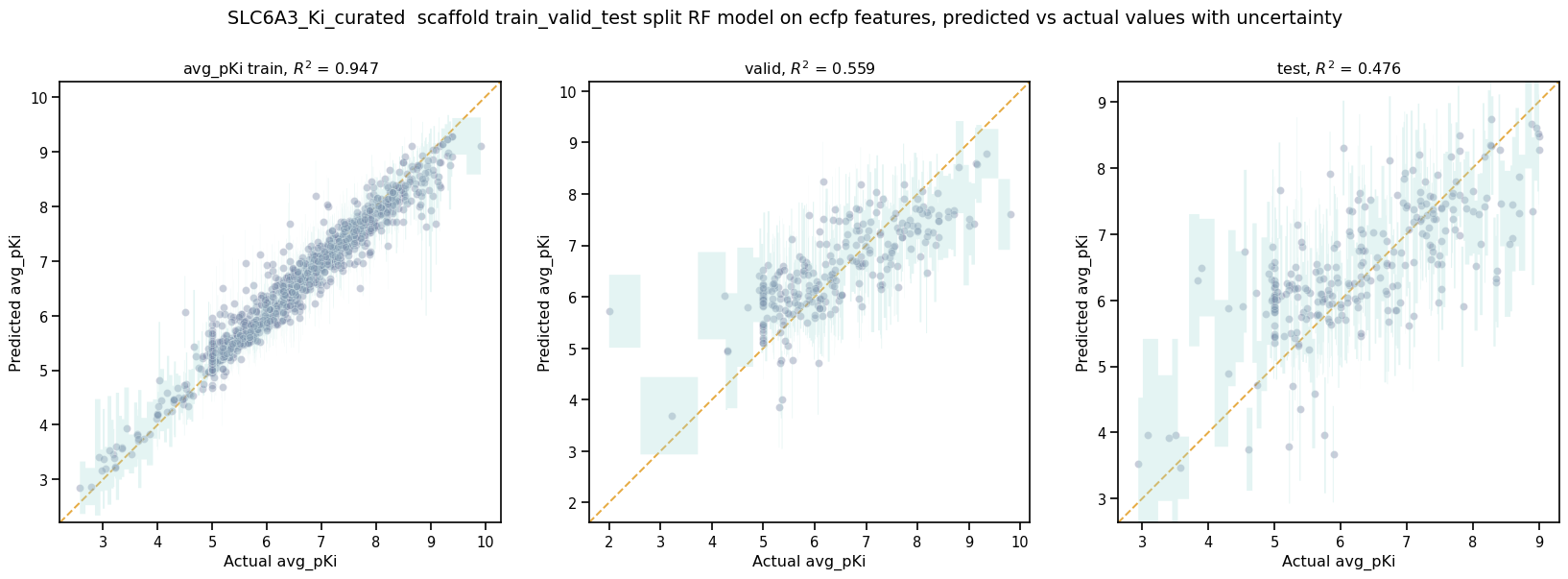
This RF model looks like it did better at training than the best NN model, even though its performance validation score is slightly lower. The low \(pKi\) values are learned more accurately in the training set, and the censored data at \(pKi\) =5 is also predicted more accurately.
# plot best xgboost model
model_type='xgboost'
model_path=result_df[result_df.model_type==model_type].iloc[0].model_path
pp.plot_pred_vs_actual_from_file(model_path)
print('\nBest valid r2 score: ',result_df[result_df.model_type==model_type].iloc[0].best_valid_r2_score)
print('\nModel Parameters: ',result_df[result_df.model_type==model_type].iloc[0].model_parameters_dict,'\n')
Best valid r2 score:  0.5031490908520113

Model Parameters:  {"xgb_colsample_bytree": 1.0, "xgb_gamma": 0.0019288871251215423, "xgb_learning_rate": 0.2158168689218416, "xgb_max_depth": 6, "xgb_min_child_weight": 1.0, "xgb_n_estimators": 100, "xgb_subsample": 1.0}
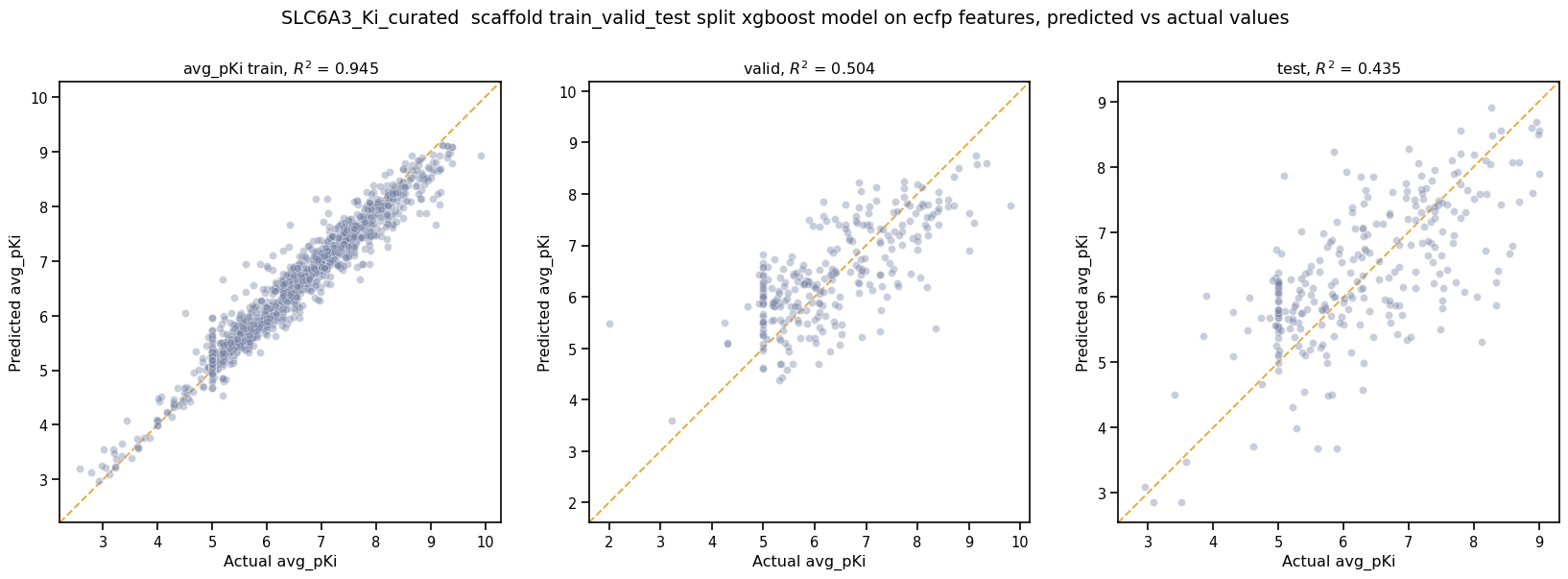
This XGBoost model learns the low \(pKi\) values better but still suffers from problems with predicting the censored data.
Moving forward, we would select the RF model as the best performer.
In Tutorial 7, “Train a Production Model”, we will use the best-performing parameters to create a production model for the entire dataset.
If you have specific feedback about a tutorial, please complete the AMPL Tutorial Evaluation.