04 Application of a Trained Model
Published: June, 2024, ATOM DDM Team
Please check out the companion tutorial video: 
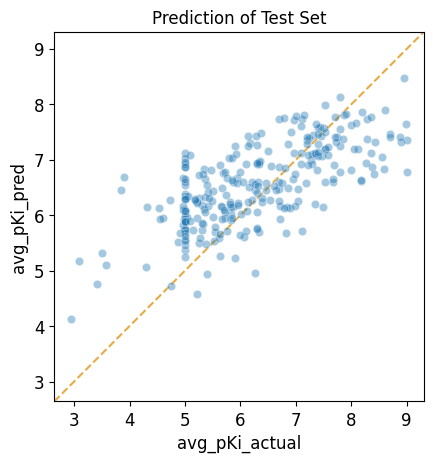
In this tutorial we will show you how to use a trained model to make predictions for a new set of compounds. As an example, we will take the model trained in “Tutorial 3: Train a Simple Regression Model”, which predicts \(pK_i\) values for inhibition of SLC6A3, and apply it to the test subset compounds from the original training dataset. Since we know the actual \(pK_i\) values for these compounds, we will then plot the predicted values against the actual values to see how well the model performs on this compound set.
This tutorial focuses on these AMPL functions:
import pandas as pd
import numpy as np
import matplotlib.pyplot as plt
import seaborn as sns

# ignore sklearn future warnings
import warnings
warnings.filterwarnings('ignore',category=FutureWarning)

from atomsci.ddm.pipeline import predict_from_model as pfm
from sklearn.metrics import r2_score
Creating The Test Dataset
First, create a test set by selecting the test data from the curated dataset. Here we are using the pre-featurized dataset to save time.
split_file_path = 'dataset/SLC6A3_Ki_curated_train_valid_test_scaffold_c35aeaab-910c-4dcf-8f9f-04b55179aa1a.csv'
curated_data_path = 'dataset/scaled_descriptors/SLC6A3_Ki_curated_with_rdkit_raw_descriptors.csv'

split_data = pd.read_csv(split_file_path)

curated_data = pd.read_csv(curated_data_path)

test_ids=split_data[split_data.subset == 'test'].cmpd_id.unique()
test_data = curated_data[curated_data.compound_id.isin(test_ids)]

# show most useful columns
test_data[['compound_id', 'base_rdkit_smiles', 'avg_pKi']].head()
compound_id |
base_rdkit_smiles |
avg_pKi |
|
|---|---|---|---|
3 |
CHEMBL17157 |
CC(C)(C)c1ccc(C(O)CCCN2CCC(C(O)(c3ccccc3)c3ccc… |
6.692504 |
7 |
CHEMBL3321789 |
OC1(c2ccc(Cl)cc2)CC2CCC(C1)N2CCCOc1ccc(F)cc1 |
6.207608 |
13 |
CHEMBL595638 |
CN1C2CCC1[C@@H](C(=O)OCc1cn(CCOC(=O)[C@H]3C4CC… |
7.795880 |
28 |
CHEMBL4447975 |
COc1cc(OC)c2c(c1)OC[C@@]1(C)NCC[C@@H]21 |
5.000000 |
41 |
CHEMBL1062 |
CC(=O)[C@@]1(O)CC[C@H]2[C@@H]3CCC4=CC(=O)CC[C@… |
5.260744 |
Performing Predictions
Next, load a pretrained model from a model tarball file and run
predictions on compounds in the test set. If the original model
response_col was avg_pKi, the returned data frame will contain
columns avg_pKi_actual, avg_pKi_pred, and avg_pKi_std. The
predictions of \(pK_i\) are in the column, avg_pKi_pred. The
avg_pKi_std column contains uncertainity estimates (standard
deviations) for the predictions.
Here we set the is_featurized parameter to true, since we’re using
the pre-featurized dataset.
Note
For the purposes of this tutorial, the following model has been altered to work on every file system. In general, to run a model that was trained on a different machine, you need to provide the path to the local copy of the training dataset as an additional parameter called “external_training_data”.
model_dir = 'dataset/SLC6A3_models/SLC6A3_Ki_curated_model_9ff5a924-ef49-407c-a4d4-868a1288a67e.tar.gz'
input_df = test_data
id_col = 'compound_id'
smiles_col = 'base_rdkit_smiles'
response_col = 'avg_pKi'

# loads a pretrained model from a model tarball file and runs predictions on
# compounds in an input data frame
pred_df = pfm.predict_from_model_file(model_path = model_dir,
                                      input_df = test_data,
                                      id_col = id_col ,
                                      smiles_col = smiles_col,
                                      response_col = response_col,
                                      is_featurized=True)


# show most useful columns
pred_df[['compound_id', 'base_rdkit_smiles', 'avg_pKi_actual','avg_pKi_pred', 'avg_pKi_std']].head()
Standardizing SMILES strings for 273 compounds.
compound_id |
base_rdkit_smiles |
avg_pKi_actual |
avg_pKi_pred |
avg_pKi_std |
|
|---|---|---|---|---|---|
0 |
CHEMBL17157 |
CC(C)(C)c1ccc(C(O)CCCN2CCC(C(O)(c3ccccc3)c3ccc… |
6.692504 |
7.741641 |
1.289527 |
1 |
CHEMBL3321789 |
OC1(c2ccc(Cl)cc2)CC2CCC(C1)N2CCCOc1ccc(F)cc1 |
6.207608 |
6.607851 |
1.069817 |
2 |
CHEMBL595638 |
CN1C2CCC1[C@@H](C(=O)OCc1cn(CCOC(=O)[C@H]3C4CC… |
7.795880 |
6.784137 |
1.271238 |
3 |
CHEMBL4447975 |
COc1cc(OC)c2c(c1)OC[C@@]1(C)NCC[C@@H]21 |
5.000000 |
6.080245 |
1.321997 |
4 |
CHEMBL1062 |
CC(=O)[C@@]1(O)CC[C@H]2[C@@H]3CCC4=CC(=O)CC[C@… |
5.260744 |
6.304104 |
1.517846 |
Evaluating Prediction Performance
Then, calculate the \(R^2\) score and compare it with the expected test \(R^2\) score of 0.426594, reported in Tutorial 3, “Train a Simple Regression Model”.
actual_value = pred_df['avg_pKi_actual']
predicted_value = pred_df['avg_pKi_pred']
r2 = np.round(r2_score(actual_value, predicted_value), 6)
r2
0.426594
Visualizing Prediction Results
We can visualize the results in a scatter plot of predicted values vs. actual values.
from atomsci.ddm.pipeline import perf_plots as pp
# Plots predicted vs actual values from a trained regression model for a given
# dataframe
pp.plot_pred_vs_actual_from_df(pred_df,
                               actual_col='avg_pKi_actual',
                               pred_col='avg_pKi_pred',
                               label='Prediction of Test Set');
In Tutorial 5, “Hyperparameter Optimization”, we will move beyond a single model and learn to optimize model hyperparameters by training many models.
If you have specific feedback about a tutorial, please complete the AMPL Tutorial Evaluation.